背景埋め込み型ボタン
つくった
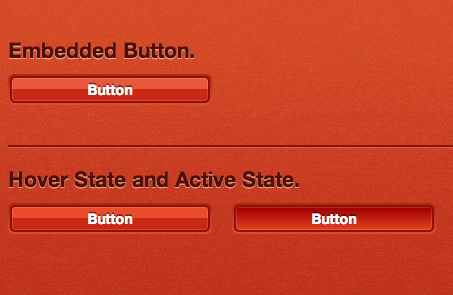
CSS3の勉強がてらボタンを作ってjsdoitに置いた。
背景埋め込み型ボタン :jsdoit
背景に埋めこまれてる感じのボタン作った。
overflow: hidden; 代用したい。
ブラウザちぇっく。
- Opera 12.14
- Google Chrome 25.0.1364.155
- Safari 6.0.2
- Firefox 19.0
Code
HTML
  <div class="bg">
  <h2>Embedded Button.</h2>
    <div class="box">
      <a href="" class="btn">Button</a>
    </div>
    <hr />
    <h2>Hover State and Active State.</h2>
    <!-- hover sample -->
    <div class="box side_by_side">
      <a href="" class="btn_hover">Button</a>
    </div>
    <!-- active sample -->
    <div class="box">
      <a href="" class="btn_active">Button</a>
    </div>
  </div>
.box {
  background-image: -webkit-linear-gradient(top, #B3250F, #DF4D33);
  background-image: -moz-linear-gradient(top, #B3250F, #DF4D33);
  background-image: -o-linear-gradient(top, #B3250F, #DF4D33);
  background-image: linear-gradient(top, #B3250F, #DF4D33);
  border-radius: 6px;
  overflow: hidden;
  padding: 2px;
  width: 200px;
}

.btn {
  background: #E8583C;
  background-image: -webkit-linear-gradient(top, #E8583C 50%, #CA2814 50%);
  background-image: -moz-linear-gradient(top, #E8583C 50%, #CA2814 50%);
  background-image: -o-linear-gradient(top, #E8583C 50%, #CA2814 50%);
  background-image: linear-gradient(top, #E8583C 50%, #CA2814 50%);
  border: 2px solid #8E1107;
  -webkit-box-shadow: inset rgba(255,255,255,0.15) 0 0 0 1px;
  -moz-box-shadow: inset rgba(255,255,255,0.15) 0 0 0 1px;
  box-shadow: inset rgba(255,255,255,0.15) 0 0 0 1px;
  border-radius: 5px;
  color: #fff;
  display: block;
  font-weight: bold;
  overflow: hidden;
  padding: 3px 6px;
  text-align: center;
  text-shadow: 0 -2px 0 rgba(0,0,0,0.5);
  text-decoration: none;
}

.btn:hover {
  background: #E84C2C;
  background-image: -webkit-linear-gradient(top, #E84C2C 50%, #CA2814 50%);
  background-image: -moz-linear-gradient(top, #E84C2C 50%, #CA2814 50%);
  background-image: -o-linear-gradient(top, #E84C2C 50%, #CA2814 50%);
  background-image: linear-gradient(top, #E84C2C 50%, #CA2814 50%);
}

.btn:active {
  background: #A30402;
  background-image: -webkit-linear-gradient(top, #A30402 10%, #E44121 100%);
  background-image: -moz-linear-gradient(top, #A30402 10%, #E44121 100%);
  background-image: -o-linear-gradient(top, #A30402 10%, #E44121 100%);
  background-image: linear-gradient(top, #A30402 10%, #E44121 100%);
}
